Automating Sequential Emails Using Zoho CRM Cadence

Zoho CRM Cadence - Automate Sequential Emails with Leads or Customers

There is a relatively new feature in Zoho CRM called 'Cadence', which allows you to setup multi step automated communications and other steps to automate various parts of your business processes.


Typically this would be done for time consuming or laborious repeated communications for example with lead nurturing or any kind of follow up process whereby you want to maintain a communication channel but may not have the necessary time to do it with a large number of recipients.
Automate communications with leads or customers using Zoho CRM cadence

Begin by creating the e-mail templates, think about the process you are automating and the communications for each step of that process.


We recommend creating an e-mail template folder just for the cadences and keeping them in there for better organisation of e-mail templates.


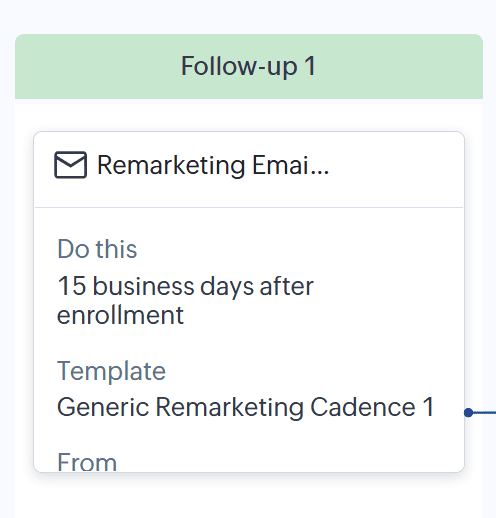
Once you have created your templates begin the cadence setup as in the above example by stating the target audience then the individual steps of the process and the communication template associated with that step.


Build this up over however long you wish to do with as many steps as required.  For example, you may wish to have the first communication to go immediately, the second to go one month after the first communication, the 3rd to go two months after the previous communication and so on.


Eventually you will have built a complete timeline sequence of communications that will be automated once the records enter the cadence. 
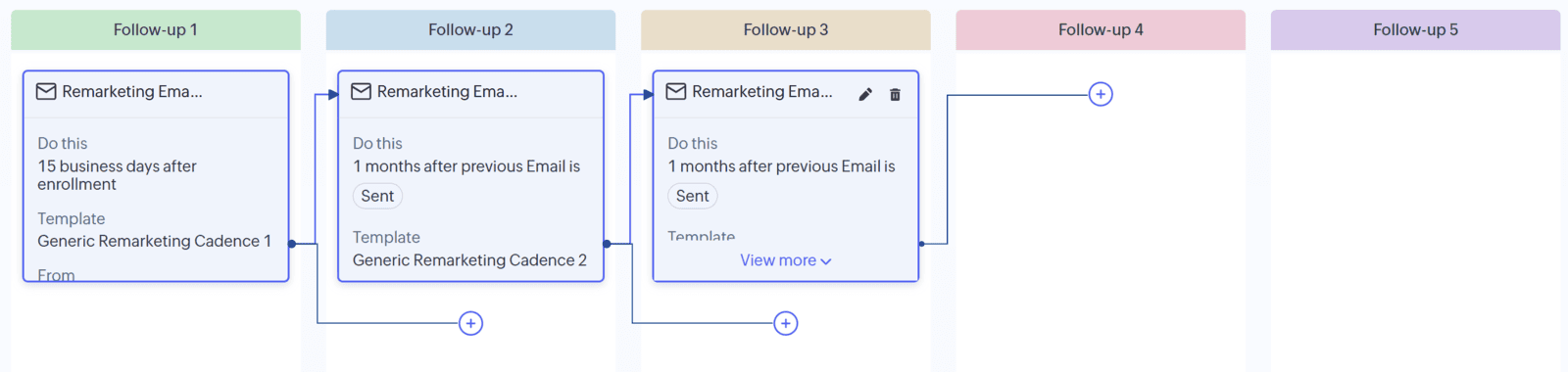
Communications automation in Zoho CRM using the new cadence feature
How Do Records Enter the Automation 'Cadence'?

Records actually enter the cadence automatically based on certain criteria which you would define in a 'View' within the CRM itself.

Let's say, for example, you want to send a sequence of communication emails to leads that have been unable to be converted, but that were not 'dead' and that you wanted to communicate with periodically for 're-marketing' purposes...

You would first create the relevant view that filters out those kinds of leads based on a criteria, for example the Lead Status field.

Then you would build the cadence based on that specific view.

Then when the lead feel this changed so that it gets included in the view you have set up it will also enter the cadence. There is an option during setup to manually enter the record, or automatically insert it into the cadence once it meets the View criteria.
Reporting

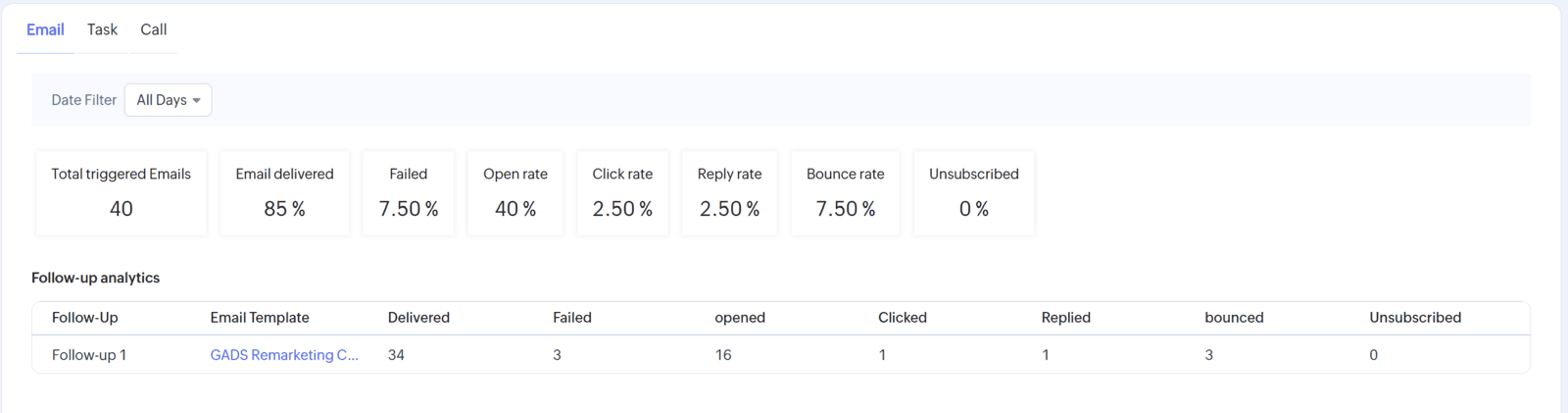
You can get a detailed understanding of the success or otherwise of your automated communications using Zoho CRM cadence reporting tool.

The cadence reports gives you an analysis on:

Triggered emails
Emails delivered
Emails failed
Open rate
Click rate
Reply rate
Bounce rate
Unsubscriptions

Using this information you can further enhance your cadence process overtime to help reach more customers using automated processes and thus improve team efficiency in multiple areas of your business.
Understand the success of your automated communications with customers using the cadence reporting in Zoho CRM
Using the funnel function will allow you to see high level automation performance data over time, based on the number of steps in your automated communication process.
Analyse the success of your multi step automated communication campaigns using Zoho CRM cadence
In the example above you can see the process is still on the first step however has a fairly good reach rate and has generated a reply from a lead that would otherwise have been lost.

By regularly reviewing the statistics for each of your automated communication steps you can develop them over time to become extremely effective ways of automating business process is and saving valuable staff time, avoiding the need for manual follow-ups for generic style communications.

Conclusion

We're already implementing this with various customers with great success and strongly recommend giving it a go! The cadence feature is just one of many new areas of Zoho CRM's new user interface and we think it's excellent for all types of businesses.